The Global Accessibility Awareness Day is being celebrated on Thursday May 21st, and the purpose of GAAD is to get everyone talking, thinking and learning about digital access and inclusion. At Webex, we continue to bring accessibility, usability, and inclusivity to the forefront of our collaboration technology to ensure everyone can hear, and be heard, see and be seen, and feel included in the conversation, everywhere.
At Webex, we believe collaboration should work for everyone: people joining from different places, speaking different languages, using different communication styles, and relying on different ways to listen, read, process, and participate. That is why accessibility, usability, and inclusivity continue to shape how we build meeting experiences.
This GAAD, we are spotlighting a few Webex innovations that help make conversations easier to follow before, during, and after the meeting.
Speaker diarization for Meeting Recordings
Ever come back to a meeting recording and think, “Wait, who said that?” We have all been there.
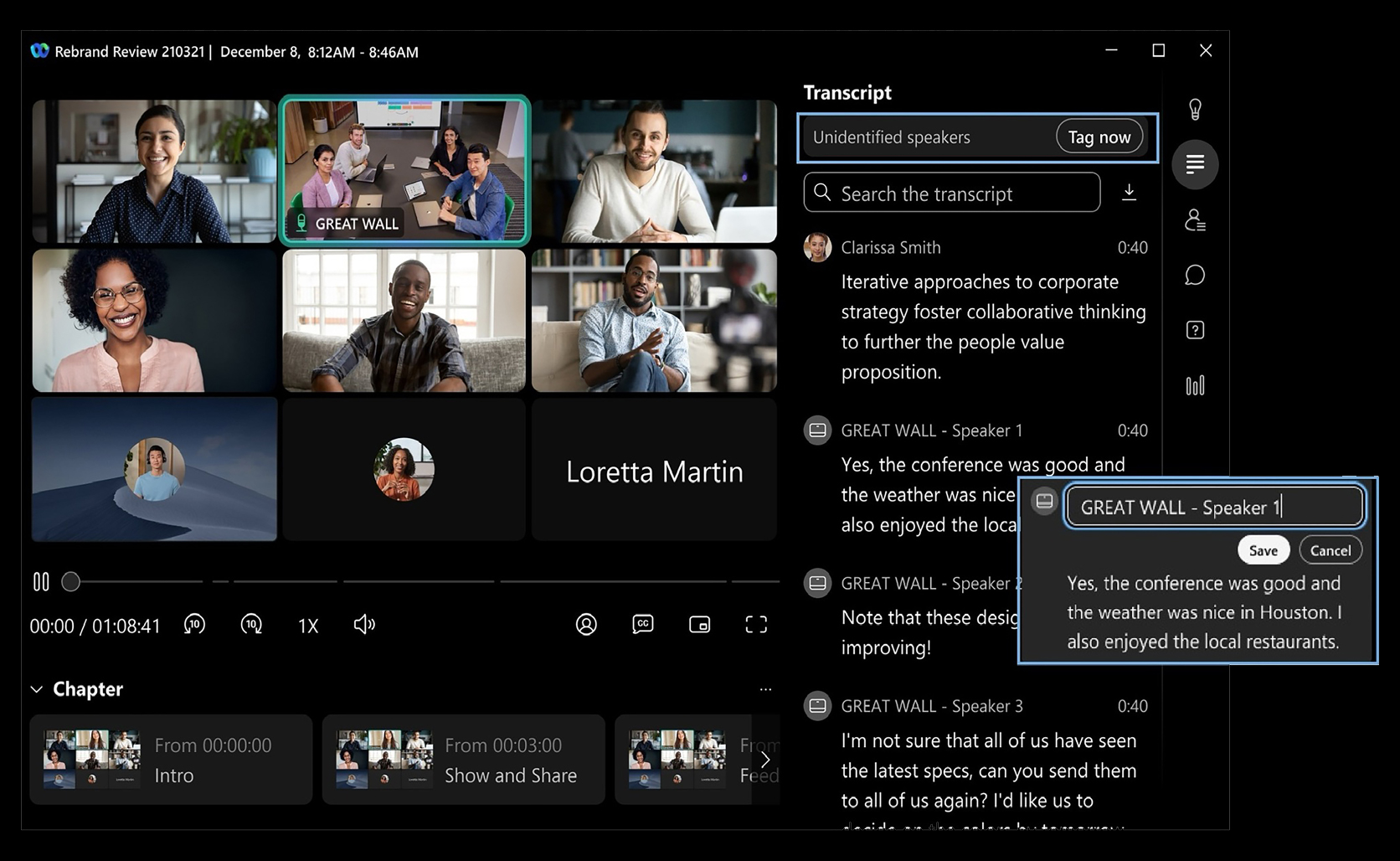
Speaker diarization helps make meeting recordings more useful by identifying who spoke when. Instead of scanning through a long recording or transcript without context, Meeting hosts can tag speakers to create accurate transcripts to allow people to follow the flow of the conversation more naturally. In Webex Recording, users can listen to a specific speaker in a recording, jump between the moments where that person spoke, and review transcripts alongside the playback. This experience is now enhanced through speaker diarization! That matters for accessibility. Clear speaker context can reduce cognitive load, make recorded content easier to understand, and help people who rely on transcripts catch up with more confidence. It also helps teams revisit decisions, action items, and key ideas without having to replay the entire meeting.
Enhanced Automatic Flash content detection
Accessibility also means creating meeting experiences that are safer and more comfortable for people with photosensitivity.
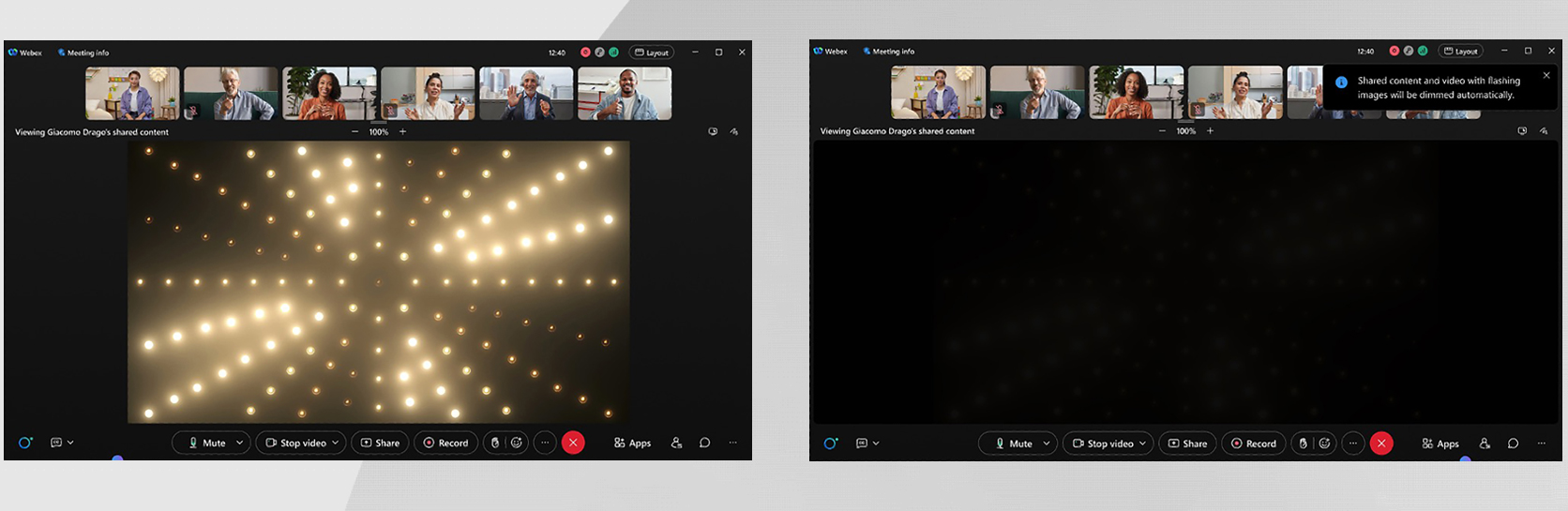
With automatic flash content detection in Webex meetings, users can choose to have flashing or strobe-like visuals dimmed during meetings. When Webex detects flickering in shared content, graphics, videos, or virtual backgrounds, the content is automatically dimmed for that user. The best part: it only changes the experience for the person who enabled it, so everyone can participate in the way that works best for them.
This is a meaningful step toward more personalized accessibility. A shared video, animated deck, or flashing visual effect should never become a barrier to joining the conversation. By helping reduce exposure to potentially uncomfortable or harmful flashing content, Webex gives people more control over how they experience meetings.
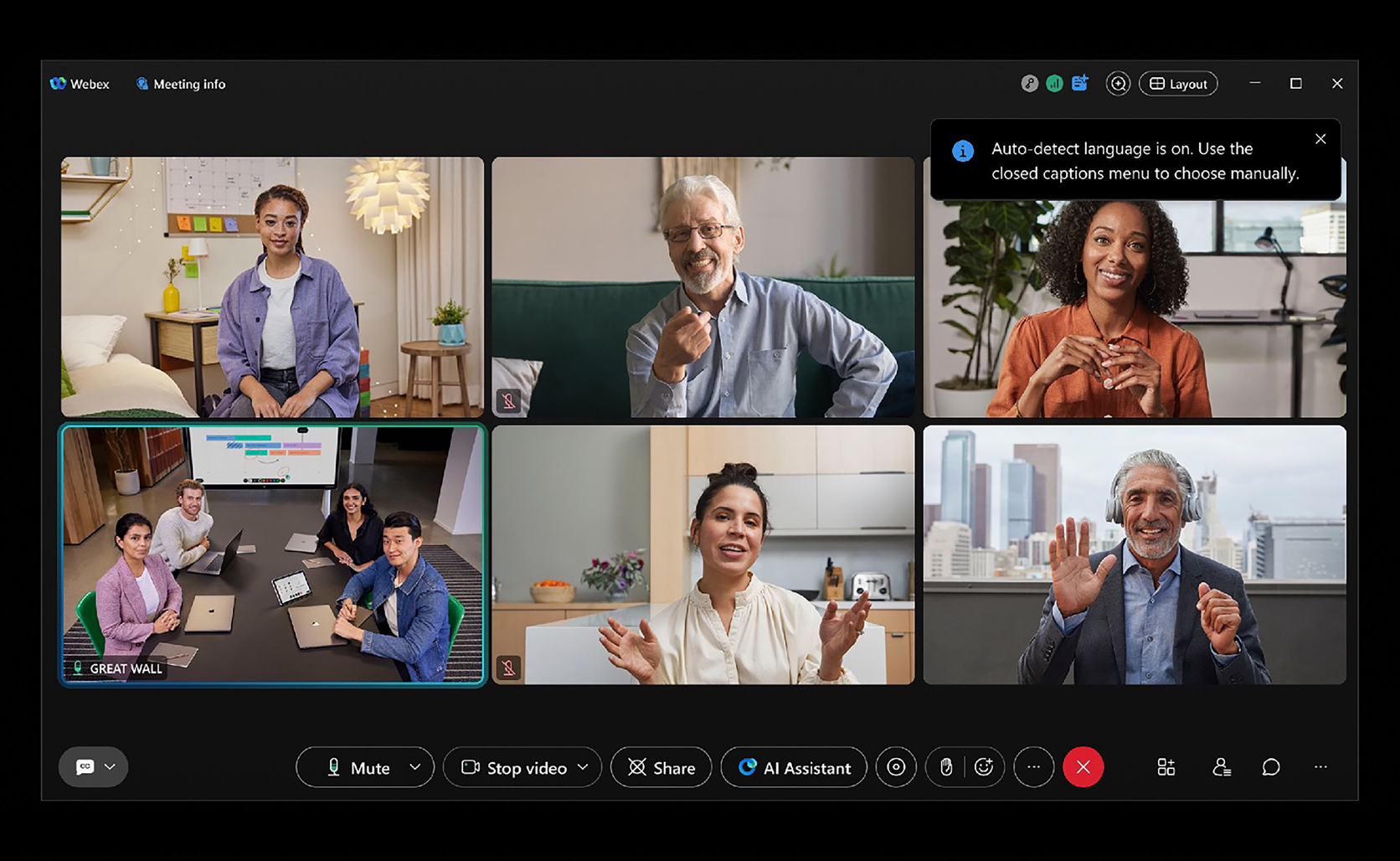
Live auto detection of spoken language for accurate captions, transcripts and AI experience.
Meetings do not always stay in one language. A team update may begin in English, shift into French for a customer example, and wrap with a discussion in Spanish. For global teams, that kind of language flow is natural. The meeting experience should keep up.
With live auto detection of spoken language, Webex can identify the spoken language in real time and automatically update captions and transcripts. That means users do not have to manually select the spoken language every time the conversation changes. Webex listens, detects, and helps keep the written meeting experience aligned with what is actually being said.
This matters because accurate language detection improves everything built on top of the conversation. Captions become easier to follow. Transcripts become more reliable after the meeting. AI-powered experiences have stronger context to work from. For participants, it means less friction and more confidence that they can stay connected to the discussion.
Ask AI Assistant: Your context when you need it.
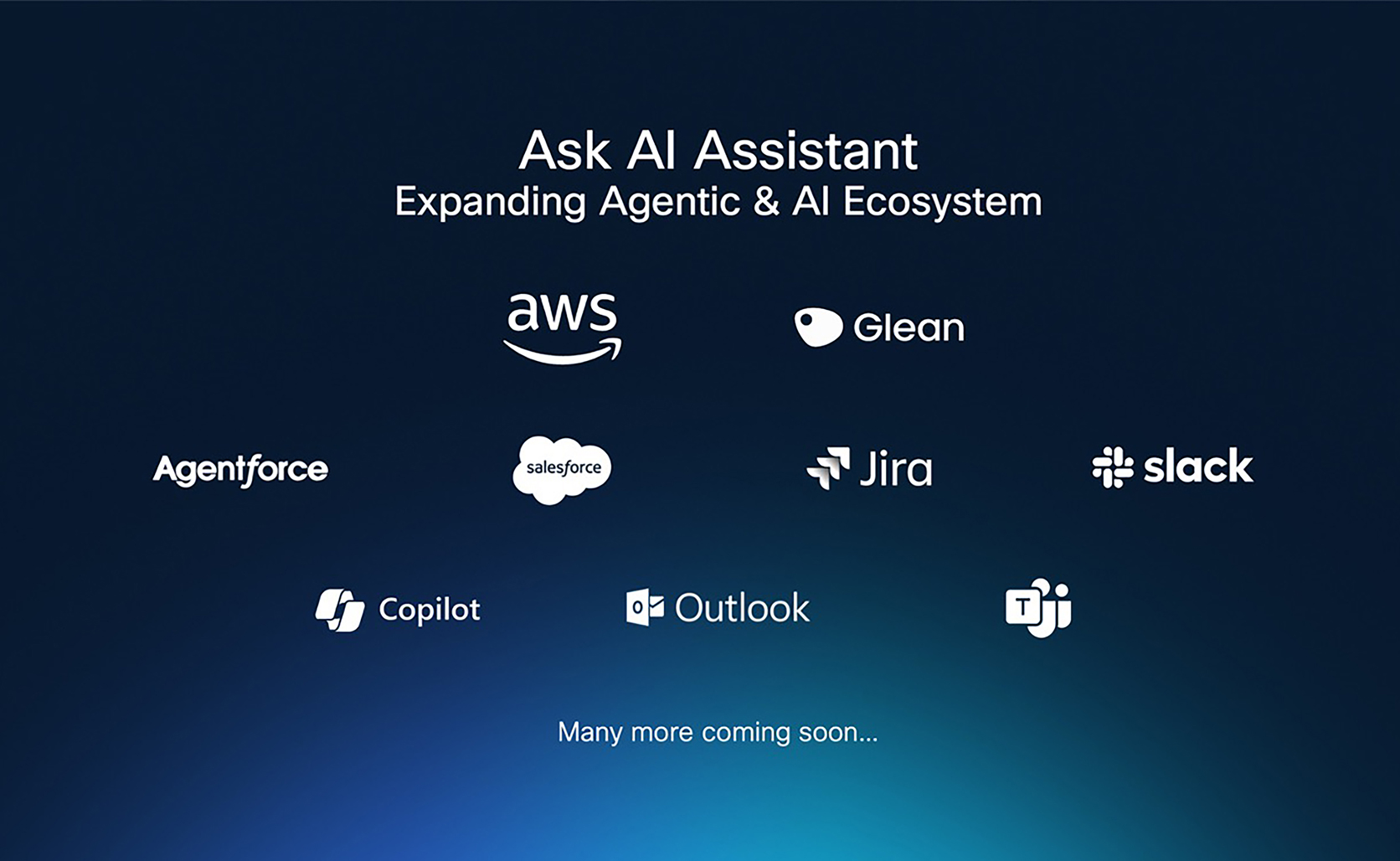
Cisco AI Assistant is becoming a richer cross-experience layer that helps reduce cognitive overload when users are trying to reconstruct what happened across meetings, calls, recordings, transcripts, and follow-ups. Instead of forcing people to scramble through multiple post-meeting and post-call artifacts, Ask AI Assistant can surface relevant context from prior Webex Calling, Meetings, and is expanding to bring in enterprise knowledge through integrations with Amazon Q Index, Glean, Microsoft 365 Copilot, Salesforce, Jira, and other systems of record. This makes the experience more accessible for users who need help recalling details, tracking decisions, or processing information after fast-moving conversations, because the information comes back in a concise, source-linked way inside the Webex flow. Across meetings and calls, Cisco AI Assistant can also capture transcripts, summaries, notes, and action items, helping users stay focused during the live conversation and revisit key details later without replaying the full interaction.
This is especially powerful for neurodiversity and supporting users with cognitive disabilities. It helps people who process information better asynchronously, need written reinforcement, miss details during live conversations, or manage attention fatigue stay included and productive. Learn more about our connected intelligence and how Webex is shaping the future of collaboration.
Scheduler Agent that makes meeting scheduling even easier!
Cisco AI Assistant scheduler makes meeting setup easier and more accessible by reducing the manual work required to coordinate calendars, time zones, and invite details. From the Webex App Meetings tab, users can ask AI Assistant to schedule a meeting or choose scheduling prompts, then review suggested meeting options before confirming. This can help users who rely on simpler, guided workflows instead of manually moving between calendar tools, especially when coordinating across multiple people or time zones. This not only reduces cognitive load but also supports users with mobility challenges: no more multiple button clicks, just let the Cisco AI Assistant take care of scheduling!
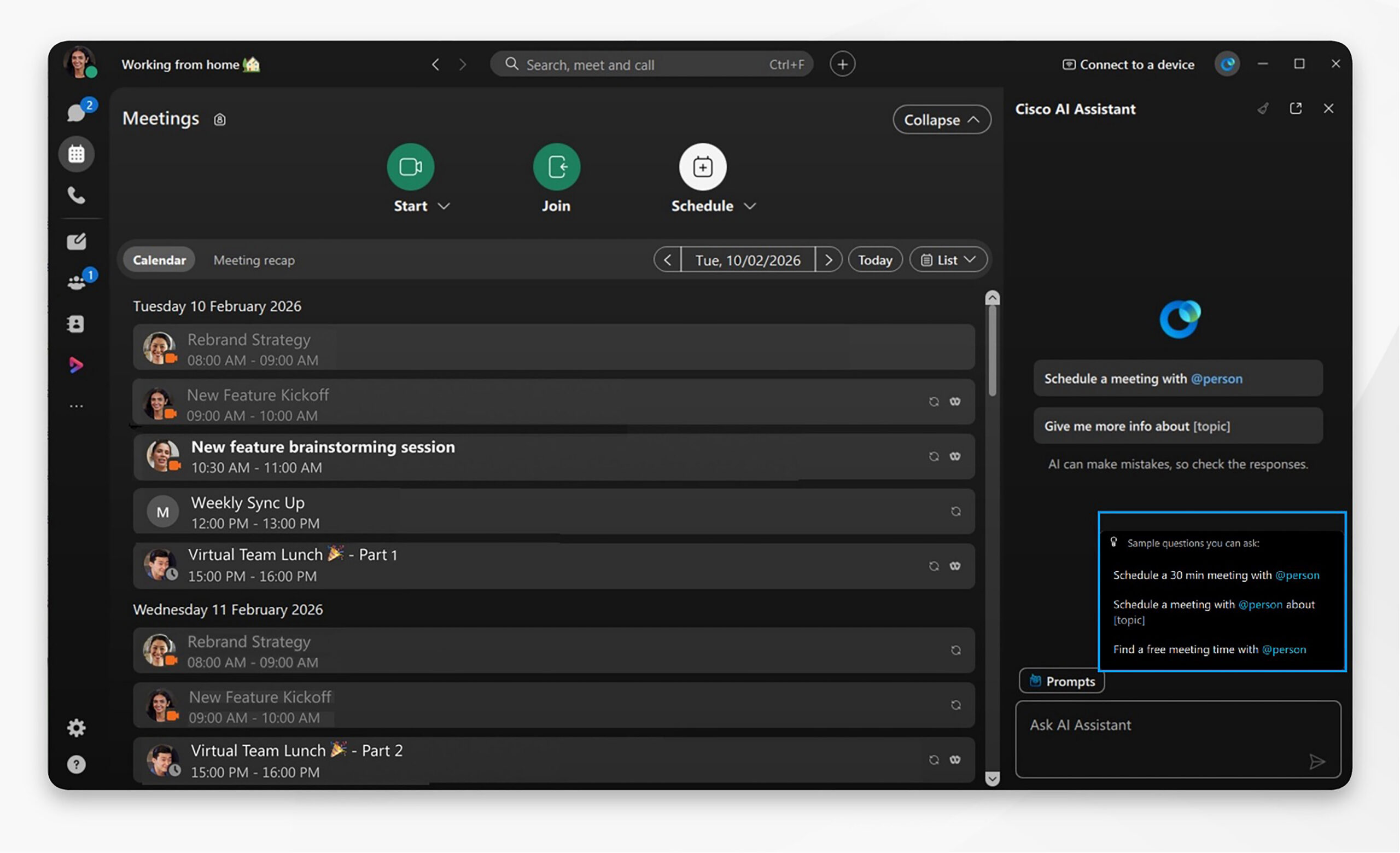
Learn more about scheduling your meeting using the Cisco AI Assistant!
Coming soon: Notetaker Agent with Live In-Meeting Speaker diarization
Notetaker Agent expands meeting intelligence beyond scheduled meetings by helping capture the informal conversations where important decisions often happen: hallway discussions, in-room conversations, ad-hoc huddles, and brainstorms. Instead of relying on someone to manually take notes or remember who committed to what, Notetaker Agent can transcribe and summarize in-person or local meetings in real time, then turn the conversation into key points and action items that are saved with meeting recaps and sent to the user’s inbox.
With live speaker diarization across Notetaker and Webex Meetings, the experience becomes more accessible and easier to review because participants can understand not only what was said, but who said it, reducing cognitive load and helping people who missed part of the conversation, process information better in writing, or need a reliable record after the discussion ends. For participants using captions or transcripts, speaker clarity can make a big difference. It helps answer the most important question in any fast-moving discussion: who is speaking right now? This is especially meaningful for people using captions and transcripts, people who process information better visually, people joining in noisy environments, and anyone trying to keep up in a lively meeting with multiple voices.
This supports a more inclusive meeting experience by making spontaneous collaboration easier to capture, revisit, and act on. Accessibility is not just about access to the meeting. It is about access to the conversation.
Coming soon: Personalize your closed captions experience
Closed captions are most powerful when they fit naturally into the way someone follows a meeting. That is why Webex is introducing more flexibility for how captions appear on screen.
Previously, captions were available in a floating mode, giving users the freedom to move the caption box around the meeting window. Now, with docked mode, users can also choose to anchor captions neatly at the bottom of the meeting window. That means captions can stay visible and predictable, without covering shared content, participant video, or other important meeting controls. This functionality is coming soon!
For some people, floating captions are perfect. They can move the caption box wherever it works best: closer to the active speaker, away from a presentation, or into a part of the screen that feels easier to scan. For others, docked captions create a more stable viewing experience, keeping the conversation in a consistent place throughout the meeting.
It is a small interaction change with a big accessibility impact: captions that work the way people need them to work.
These are just a few examples of our innovations to enable a more inclusive, accessible collaboration experience for all. There’s more to come. We are committed to making collaboration accessible and inclusive for people of all abilities and backgrounds. If you have questions, comments, or suggestions, share them with us, visit us here, or email accessibility@cisco.com.
About The Author